
License Key Attachment Grayed Out in Outlook Express (Windows XP)
On Windows XP, Outlook Express can block the license key attached to your registration email: the attachment is shown grayed out and cannot be opened or saved. This is caused by an Outlook Express security option and takes a minute to fix.
The problem
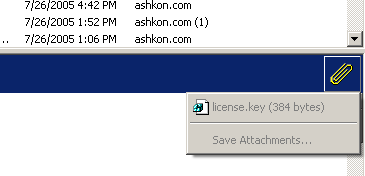
When you click the paperclip icon of the registration email, the license key attachment and Save Attachments are grayed out:
How to fix it
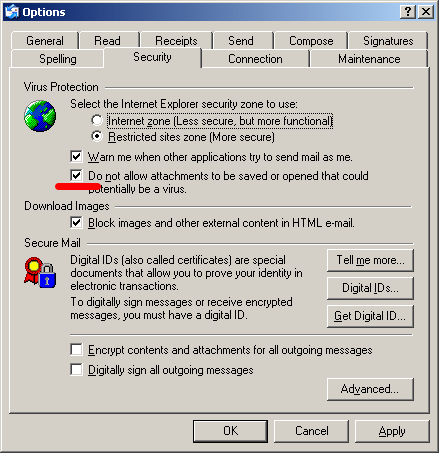
- Open the options. In Outlook Express choose Tools → Options.
- Go to the Security tab. Under Virus Protection, clear the check box Do not allow attachments to be saved or opened that could potentially be a virus.
- Save the setting. Click Apply, then OK, and close Outlook Express.
Apply the license key
- Run the product once. Start the program you purchased at least once before you apply the key, then close it.
- Open the attachment. Start Outlook Express again, select the registration email and double-click the attached key file.
- Confirm. Answer Yes when Windows asks whether to add the information to the registry. A message confirms that the information was entered into the registry.
- Restart the program. Start the product again – the evaluation restrictions are removed.
Once the key is applied you can turn the security option back on.
Prefer not to change security settings? You do not have to open the key from inside the email program. Save the attachment to disk (if your email program allows it) or open the registration email on another computer or in web mail, then follow How to apply your license key.
Other versions of Windows
- Windows 11, 10, 8 and 7: see How to apply your license key.
- Windows XP with Outlook Express: see License key grayed out in Outlook Express.
- Windows Vista with Windows Mail: see License key grayed out in Windows Mail.
Still stuck? Email support@ashkon.com with the product name and the email address used for your order, or ask us to resend the key at order@ashkon.com.