Features
Opening and reading Outlook data files
- PST and OST files of all Outlook versions: ANSI (Outlook 97–2002), Unicode (Outlook 2003 and later) and OST files of Outlook 2013 and later (4 KB pages, compressed blocks).
- Opens password-protected PST files seamlessly — no password prompt, no password needed; files protected with an Outlook PST password open like any other file.
- Works without Outlook — no MAPI, no Exchange account, no Outlook profiles.
- Read-only, shared access: your data files are never modified, and a file can stay open in Outlook.
- Open files from the File menu, by drag and drop, from the command line, from the recent file list or with "Open with" in Windows Explorer.
- Large files: messages appear immediately while big folders are still loading in the background.
- Full Unicode support for file names, folder names and message text in any language; per-message code pages for ANSI PST files.
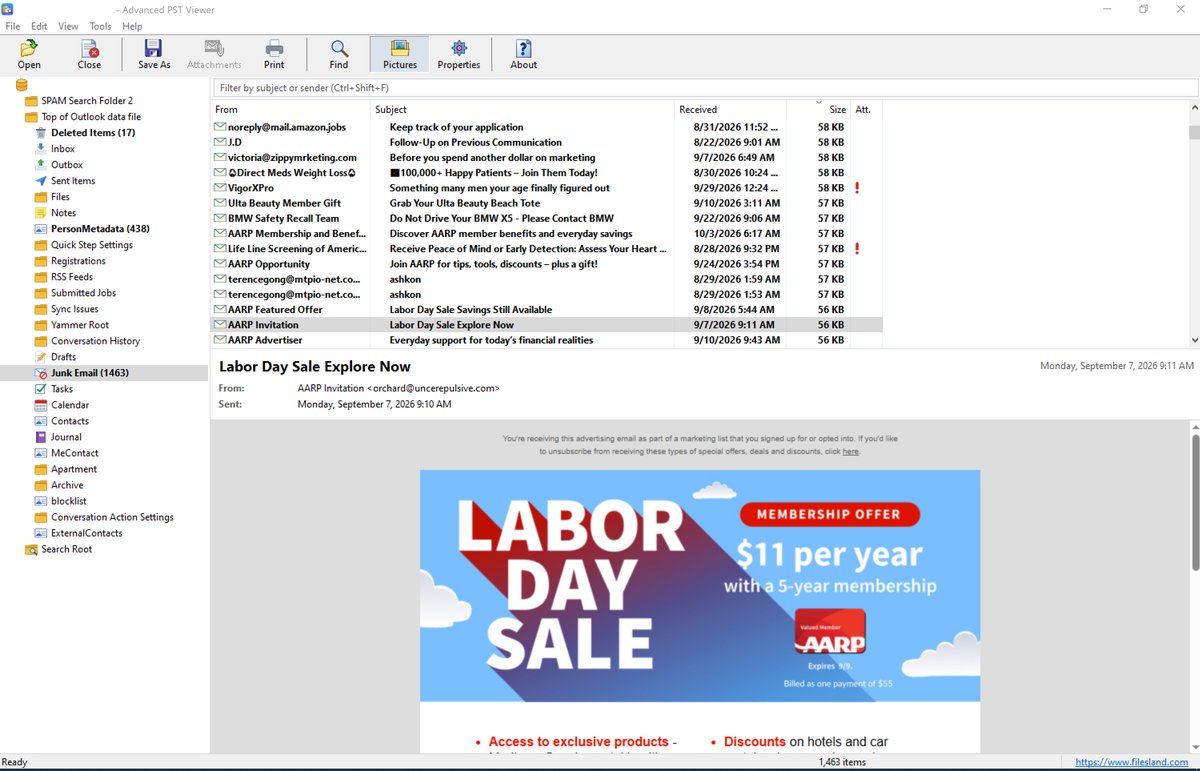
- Familiar three-pane layout: folder tree with unread counts and special folder icons, message list and reading pane.
- Contacts, calendar items, meetings, tasks, notes, journal entries, distribution lists and reports are shown with their own fields.
- Double-click a message to open it in its own window; attached (embedded) messages open in their own window as well.
- Window position, splitters, column widths and sort order are remembered.
Accurate message display
- HTML messages rendered by Microsoft Edge WebView2, with inline images.
- RTF messages converted to HTML (fonts, colors, bold / italic, hyperlinks, pictures); HTML encapsulated in RTF is restored.
- Plain text messages with clickable links.
- Privacy protection: scripts never run, links open in your default browser, and pictures from the Internet (including tracking pixels) are downloaded only when you allow it.
- The real target of a link is shown on hover.
- Print messages with a header block (subject, from, sent, to, cc, attachments).
Attachments
- Open, save and save all attachments of a message (with a warning for executable and other risky file types).
- Extract attachments in bulk from the selected messages, the whole message list or a folder with all its subfolders.
- Filter by file type (for example
*.pdf; *.docx), skip inline pictures, save attached messages as .eml, create a subfolder for each mail folder and add a date prefix to file names.
Save and export
- Save a message as EML (opens in Outlook, Thunderbird, Windows Mail), single-file HTML with embedded images, plain text or PDF.
- Export selected messages, a folder, or a folder with all its subfolders to EML, HTML, TXT, PDF or MBOX (one file per folder, for Thunderbird and Apple Mail).
- Contacts to vCard (.vcf) and calendar items, meetings and tasks to iCalendar (.ics) with recurrence, exceptions, reminders, organizer and attendees — for Outlook, Google Calendar and Apple Calendar. Optionally one combined .vcf / .ics file per folder.
- Recreate the folder structure on disk.
- File name patterns such as
{date}_{from}_{subject} (tokens: date, time, subject, from, to, folder, type, index, id, year, month, day); long names are shortened automatically and duplicates are numbered.
- Export the message list to CSV (Excel) for reports and eDiscovery: folder, type, subject, sender, To / Cc / Bcc, sent and received dates, size, importance, read status, flag, categories, attachment count and names, Message-ID and more.
Search and organize
- Find messages by subject, people (sender and recipients, sender only or recipients only), message text or attachment names, in the whole file or in a selected folder.
- Search options: match case, whole words, date range, "with attachments" and message size range; the results show the folder of each message.
- Search hits are highlighted in the message body, subject, From / To / Cc lines and attachment names.
- Quick filter box above the message list (Ctrl+Shift+F) filters by subject or sender as you type.
- Column chooser: From, Subject, Received, Size, Attachment, To, Cc, Sent, Importance, Flag, Categories — drag to reorder; your choice is remembered.
- Sort by any column and group by date (Today, Yesterday, Earlier This Week, Last Week, Earlier This Month, Last Month, Older).
Forensic and technical tools
- Internet headers of a message.
- Message properties: all MAPI properties with names, types and values, including named properties; copy to the clipboard.
- Recover deleted items from the unused space of the file, and show orphan items.
- File information about the open data file.
HTML messages are displayed by Microsoft Edge WebView2, the same modern engine used by Microsoft Edge, so newsletters, signatures, tables and inline pictures look the way the sender designed them. Messages stored as RTF are converted, and HTML hidden inside RTF bodies is restored. Password-protected PST files open seamlessly, without asking for the password. Your data files are opened read-only and are never modified.
Main window
The folder tree of the Outlook data file is on the left, the message list with the quick filter box is on the top right, and the selected message is shown in the reading pane below it.
Read the full Advanced PST Viewer User Guide: opening PST and OST files, searching, saving attachments, exporting to EML, PDF, MBOX, vCard and iCalendar, CSV reports and recovering deleted items.
Ordering
After a completed secure online order, an unlocking key file is emailed to you within two business days. Questions about ordering or registration: order@ashkon.com. Prices for all products are on the Order page.