Advanced Hash Calculator
$19.95Calculate MD5, SHA-1, SHA-256, SHA-512, SHA-3, BLAKE3, CRC32 and 32 hash algorithms for many files and folders at once.

Easy File Joiner puts split files back together and combines several files into one. It rejoins .001 / .002 parts and spanned .z01 … .zip archives, merges ZIP archives, joins MP3 and WAV recordings into a file that plays with the correct length, and appends logs and CSV files with a single header row – checking the parts and verifying checksums before and after. Free for any use.
Free download User guide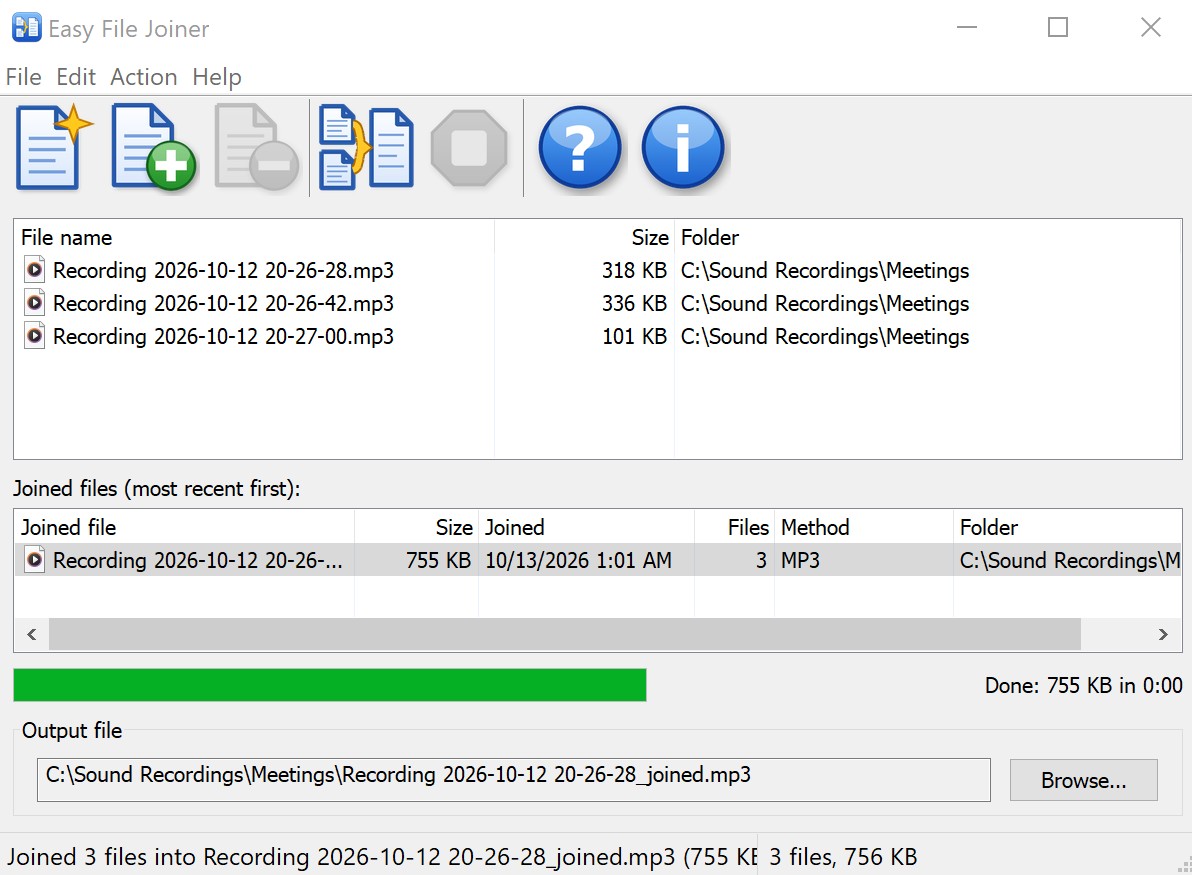
movie.mpg.001, .002, … or data.part1, .part2, … are joined byte for byte into the original file..009, .010, .011)..crc file. You see one warning listing every problem, and the safe answer – don’t join – is the default.movie.mpg for movie.mpg.001..sfv, .md5, .sha1, .sha256, .sha512, Total Commander .crc, MD5SUMS, SHA256SUMS and CHECKSUMS files next to the parts by itself – no need to add them to the list.backup.z01, backup.z02, …, backup.zip) from WinZip and Info-ZIP are rebuilt into one standard ZIP file. Simply appending them gives a damaged archive; Easy File Joiner rewrites the archive directory instead. Nothing is unpacked or recompressed, and archives over 4 GB (ZIP64) are supported..part1.rar, .r00) are recognized, and you are told which volume to open in WinRAR or 7-Zip instead..joining file and renamed only when everything succeeded, so Stop, a full disk or an error never leave a half-written output file.efjoin.exe brings the same joining engine, checks and checksum verification to batch files, scripts and scheduled tasks. Setup can add it to the PATH./mode to choose the join method, /dry-run to preview, /force, /overwrite, /quiet; clear exit codes for scripts.efjoin movie.avi.001 rejoins all parts into movie.avi and verifies them against the .sfv file in the folder.movie.mpg.001, onto the list. The other parts in that folder are added automatically. You can also select the parts in Explorer, right-click and choose Join files with Easy File Joiner.movie.mpg, is suggested in the Output file box. Click Browse to choose another name or folder..001, .002, … parts with HJSplit, 7-Zip, Total Commander or GSplit, and you need the original file back..z01, .z02, …, .zip) that will not open: rebuild it into one standard ZIP file..sfv, .md5 or .sha256 file came with the parts, and you want to know that every part and the joined file are correct.Need the checksum of any file? Advanced Hash Calculator calculates SHA-256, MD5, CRC32 and 29 other hashes for many files at once. Making recordings to join? Free Wave Sound Recorder records from a microphone to WAV and MP3.
Read the full Easy File Joiner User Guide: step-by-step joining, split files and checksum verification, ZIP, MP3, WAV and text joins, every warning, the efjoin command line with examples, and troubleshooting.
Drag the first part (for example movie.mpg.001) onto the Easy File Joiner list, or add it with File > Add Files. The other parts are added automatically and sorted in number order. Check the output file name and choose Action > Join Files (F5).
No. Easy File Joiner joins the parts byte for byte into the original file, the same way the splitter cut it. If the original file is an archive, such as a .7z or .zip file, open it with your archive program after joining.
Add the .zip file or any of its parts. Easy File Joiner rebuilds the volumes into one standard ZIP file by rewriting the archive directory. Nothing is unpacked or recompressed, and archives over 4 GB are supported.
Yes. MP3 files are joined without re-encoding, so there is no loss of quality. The first file's tags are kept and the length header is updated, so players show the full length and seek correctly. WAV recordings get one correct header for the whole recording.
Add the CSV files and join them. When all files start with the same header row, Easy File Joiner asks whether to keep only the first file's header row, so you get one clean table.
Before joining, Easy File Joiner warns about missing parts, parts of the wrong size and duplicate part numbers, and the default answer is not to join. If a checksum file is found and a checksum does not match, the message names the damaged part, and an existing output file is never replaced by a damaged one.
Yes. It is freeware for personal, business, educational and government use, on any number of computers, with no registration. It runs on Windows 10 and 11.
Calculate MD5, SHA-1, SHA-256, SHA-512, SHA-3, BLAKE3, CRC32 and 32 hash algorithms for many files and folders at once.
Checks Visa, Mastercard, AMEX, Diners Club, Discover and JCB card numbers with the Luhn (mod 10) algorithm and detects the card type.
Estimates US and Canadian federal income tax, average tax rate and marginal tax bracket for a selected tax year.