Advanced File Shredder
$29.95Securely erases files, folders, the Recycle Bin and drive free space with DoD 5220.22-M, Gutmann or random-data passes, then verifies the erasure.

Many programs quietly add themselves to Windows startup, slowing down boot time and wasting memory – and malware uses the same places to launch itself. Simple Startup Manager shows everything that starts automatically with Windows 10 and Windows 11 in one window and lets you enable, disable, edit, add or delete any startup item with a single click.
Download free trial Buy now – $24.95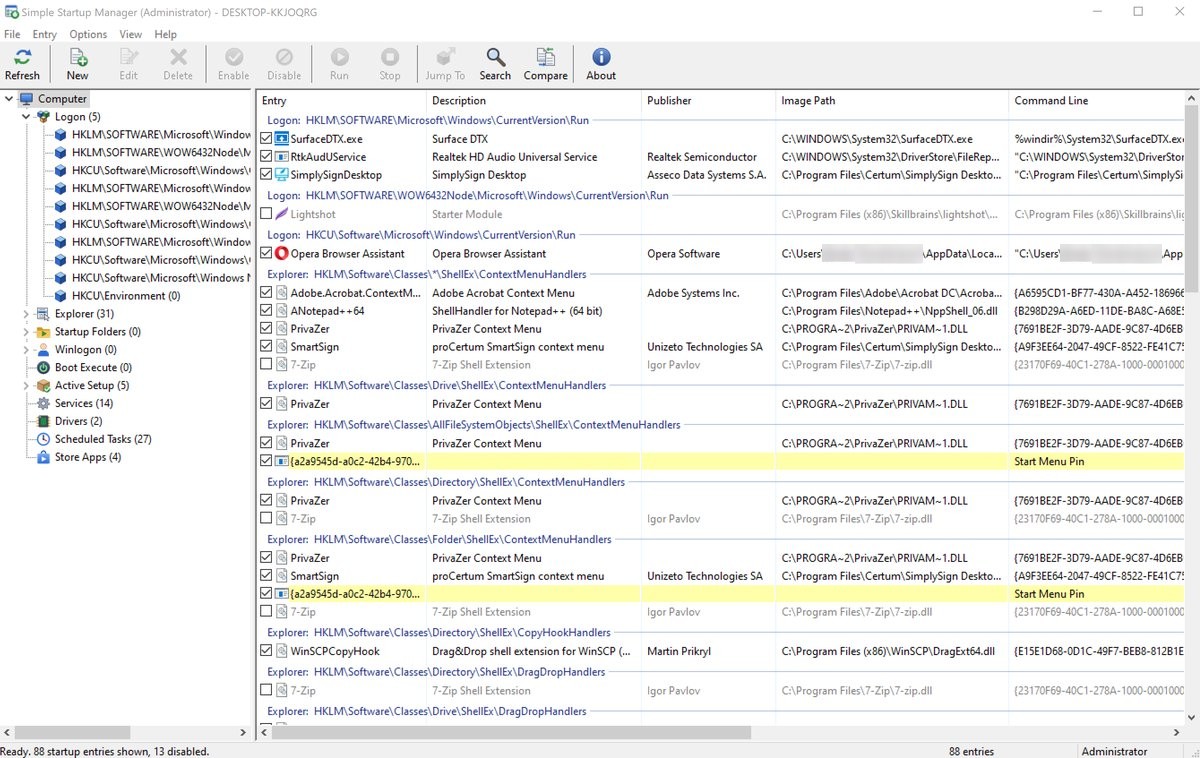
Startup items are organized in a tree by location: Logon (Run keys), Startup folders, Services, Drivers, Scheduled Tasks, Explorer shell extensions, Winlogon, Boot Execute, Active Setup and Microsoft Store apps. For each entry you see its description, publisher, file path, command line, version and digital signature, so unknown or unsigned programs stand out immediately.
Disabling an item does not delete it: Simple Startup Manager uses the same methods as Windows Task Manager and Settings, so you can turn items back on at any time. Before anything is deleted, a backup copy is saved automatically.
Want to see what is running right now? Advanced Process Explorer shows every running process with its CPU and memory use, command line and digital signature.
Open Simple Startup Manager, select Logon or Startup Folders in the tree, or Computer to see everything, and clear the check box of the entry you do not want. It no longer starts with Windows. Check the box again to turn it back on.
Disabling does not delete anything. Simple Startup Manager disables entries the same way as Task Manager and Settings, so you can turn them back on at any time. Entries that Windows needs to start cannot be disabled, and before an entry is deleted a backup copy is saved.
The Startup apps page of Task Manager shows only part of what starts automatically. Services, drivers, scheduled tasks, Explorer shell extensions, Winlogon, Boot Execute and Active Setup entries are not on it. Simple Startup Manager shows all of these in one window.
Turn on Options > Verify Code Signatures: unsigned entries and entries with an untrusted signature are highlighted, and entries whose file is missing are shown in yellow. Right-click an entry to check its file on VirusTotal by SHA-256 hash or to search for it online.
Yes. A disabled entry stays in the list and can be enabled again with one click. Every deleted entry is backed up first to a backup folder, which Help > Open Backup Folder opens.
Yes. A standard user can run it without a Windows prompt and change his own startup entries. To change entries for all users, services and drivers, use File > Run as Administrator.
Yes. The trial is fully functional for 30 days. A license is $24.95.
After a completed secure online order, an unlocking key file is emailed to you within two business days. Questions about ordering or registration: order@ashkon.com. Prices for all products are on the Order page.
Securely erases files, folders, the Recycle Bin and drive free space with DoD 5220.22-M, Gutmann or random-data passes, then verifies the erasure.
Lists every open TCP and UDP port and connection, IPv4 and IPv6, with the owning process, remote host name and network owner. A readable replacement for netstat.

Automatically shut down, reboot, power off or log off a PC, shut down a remote computer and schedule logon after reboot.