IP Monitoring Tool
$19.95Website, server and uptime monitor: HTTP/HTTPS status, content changes, keywords, ping, TCP ports and DNS, with Windows notifications and TLS expiry warnings.

WinTraceRoute shows the route that network packets take from your PC to any host on the Internet or your local network. Enter a host name or an IPv4 / IPv6 address, click Trace, and every router along the path is listed with its minimum, average and maximum round-trip time, packet loss and a latency graph, together with its host name, network owner (ASN and AS name), announced BGP prefix and country.
Download free trial Buy now – $19.95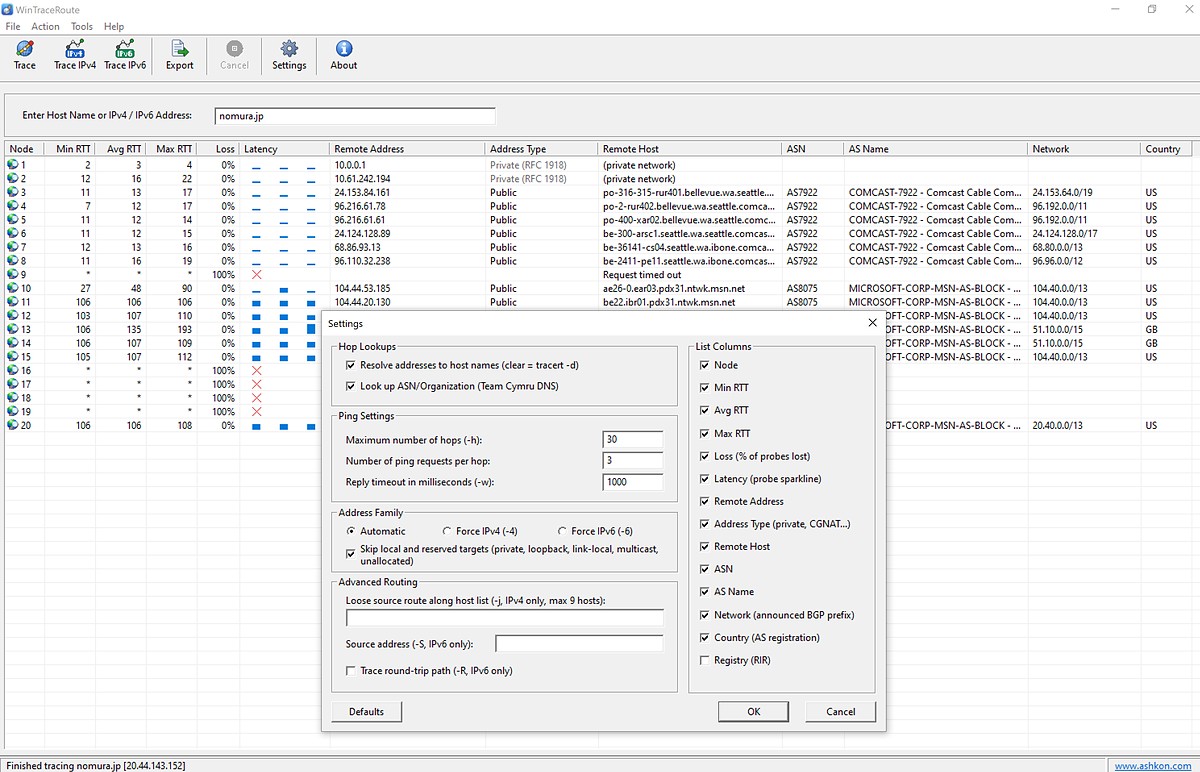
Use it to find where a connection slows down or breaks: in your home or office network, at your Internet provider, on a backbone network or at the hosting provider of the destination site. Address types such as private (RFC 1918) and CGNAT ranges are labeled automatically, and all of the familiar tracert options — hop limit, timeout, IPv4 / IPv6, loose source routing — are available in one Settings dialog. WinTraceRoute is Windows based, fully configurable and faster than the tracert tool that comes with Windows. For a full help guide please see the WinTraceRoute Help page.
Intermittent problem? A single trace can miss it. PingTrace repeats the traceroute continuously (MTR) and pings the host at the same time, so short bursts of packet loss show up in the statistics.
Each row of the list is one hop on the route to the destination. The toolbar has the trace commands, and the status bar shows the result of the last trace. In the screenshot below a route to nomura.jp is traced; the Settings dialog is open on top of the results.
Windows has the tracert command. WinTraceRoute does the same in a window: type a host name or IP address and click Trace. Each router on the path is listed with its round-trip times, packet loss, host name and network owner.
The router did not answer the probes within the timeout. Many routers are set up not to answer traceroute. If the hops after it answer, traffic is still getting through.
Loss that starts at one hop and continues on every hop after it points to a problem at that hop. Loss at a single router with no loss on the hops after it usually means that router gives low priority to traceroute replies.
Yes. The ASN, AS Name, Network, Country and Registry columns show the network that each address belongs to, and Action > Whois / IP Info shows its registration record with the owner and abuse contacts.
Yes. Trace picks the address family automatically, and Trace IPv4 and Trace IPv6 force one of them. IPv6 tracing needs an IPv6 connection.
WinTraceRoute runs a single visual traceroute. PingTrace runs ping and traceroute side by side, repeats the traceroute continuously in MTR mode and adds a TCP port check.
Yes. The free 30-day trial runs on Windows 10 and 11. A license is $19.95.
After a completed secure online order, an unlocking key file is emailed to you within two business days. Questions about ordering or registration: order@ashkon.com. Prices for all products are on the Order page.
Website, server and uptime monitor: HTTP/HTTPS status, content changes, keywords, ping, TCP ports and DNS, with Windows notifications and TLS expiry warnings.
Lists every open TCP and UDP port and connection, IPv4 and IPv6, with the owning process, remote host name and network owner. A readable replacement for netstat.
Home network scanner: finds every device on your network and identifies it – IP and MAC address, manufacturer, device type, name and open ports.