Simple Startup Manager
$24.95See and control everything that starts with Windows 10 and 11: Run keys, startup folders, services, drivers, scheduled tasks and more.

RebootEx shuts down, restarts or logs off your computer with one click, or at a time you pick on a clock face. It can sign you in automatically every time Windows starts with permanent Autologon, or just once after a restart, shut down other computers on your network, and do all of this from scripts and the Task Scheduler with its command-line tool.
Download free trial Buy now – $24.95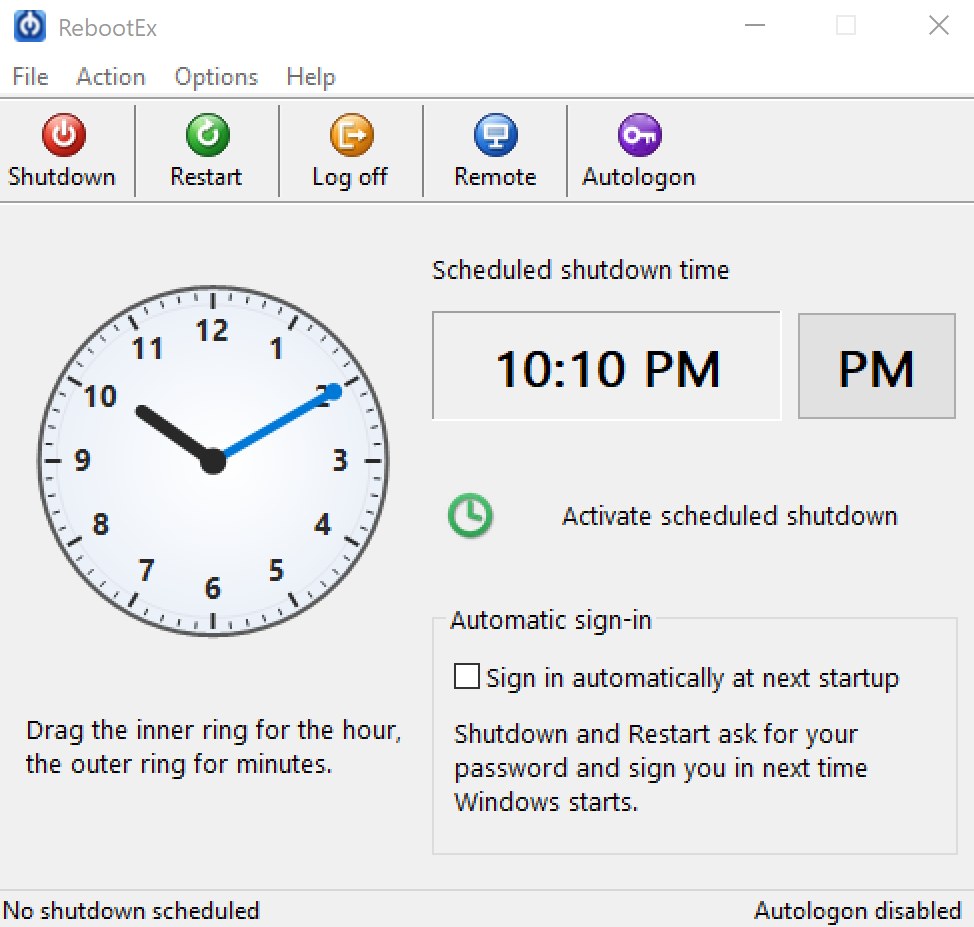
rebootex32.exe, rebootex64.exe) for batch files, logon scripts, unattended setups and the Windows Task Scheduler. Setup can add them to the PATH so rebootex works from any command prompt.-reboot, -shutdown, -poweroff, -logoff.-logon <user> [<domain>] <password> signs a user in automatically after the restart; add -lock to lock the computer right after that sign-in.-enable <user> [<domain>] <password> turns on permanent Autologon and -disable turns it off; -enable MYPC\user asks for the password without showing it.-arm sets up a one-time sign-in for the next start without restarting; -disarm cancels it.-killifhung ends programs that do not close by themselves; -killall ends all programs immediately.-wait <seconds> delays the action; -quiet shows only errors.rebootex \\OFFICEPC -reboot -u Administrator -p password.rebootex -poweroff -killifhung in a daily Task Scheduler task turns the computer off at the same time every night.8 when the user name or password is wrong.Read the full RebootEx User Guide: the main window, scheduled shutdown, Autologon, one-time sign-in, remote shutdown, the tray icon and all command-line options with examples.
rebootex -reboot at the time you want.rebootex \\PC -reboot.Running programs after an automatic sign-in? Simple Startup Manager shows and controls the programs that start with Windows 10 and 11.
Set the time on the RebootEx clock face and click Activate scheduled shutdown. RebootEx stays in the notification area and turns the computer off at that time every day, after a 25-second warning with a Cancel button, until you deactivate it.
Yes. Create a task in the Windows Task Scheduler that runs rebootex -reboot at the time you want. Add -killifhung to close programs that do not respond, or -wait to delay the restart by a number of seconds.
Click the Autologon button, type the password for the account and click Enable. RebootEx checks the user name and password with Windows first. From then on Windows signs in to that account at every start until you click Disable. The password is stored as a protected LSA secret, not as plain text.
Yes. Check Sign in automatically at next startup, then click Shutdown or Restart and enter your user name, domain and password. The automatic sign-in is used once, and your previous settings are restored afterwards.
Click Remote, enter the computer name and an administrator user name and password for that computer, and click OK. If the shutdown fails, RebootEx shows the Windows error message. From the command line, use rebootex \\COMPUTER -reboot -u user -p password.
Yes. RebootEx runs on Windows 7, 8, 8.1, 10 and 11, 32-bit and 64-bit.
Yes. RebootEx is free to evaluate for 10 days. A license is $24.95, and a site license for all computers at one site of one organization is $299.95.
RebootEx is free to evaluate for 10 days. After a completed secure online order, an unlocking key file is emailed to you within two business days. Questions about ordering or registration: order@ashkon.com. Prices for all products are on the Order page.
See and control everything that starts with Windows 10 and 11: Run keys, startup folders, services, drivers, scheduled tasks and more.
Securely erases files, folders, the Recycle Bin and drive free space with DoD 5220.22-M, Gutmann or random-data passes, then verifies the erasure.
Process viewer for Windows: process tree with CPU, memory and command line, handles, DLLs and threads, find which process has a file open, kill, suspend or restart processes.