
Batch website screenshot capture: full-page screenshots, thumbnails and PDF for long lists of URLs, up to 20 pages in parallel.
Presentation Ticker: Scrolling Desktop Ticker with Clickable Links for Windows
Presentation Ticker scrolls your own messages across a thin bar docked to the top or bottom edge of the screen. Each message is a headline with an optional link: click it and the web page, document, folder or e-mail address behind it opens. The bar is a Windows desktop toolbar, so maximized windows, browsers and windowed PowerPoint slide shows stay clear of it, and the messages are always visible.
Download free trial Buy now – $19.95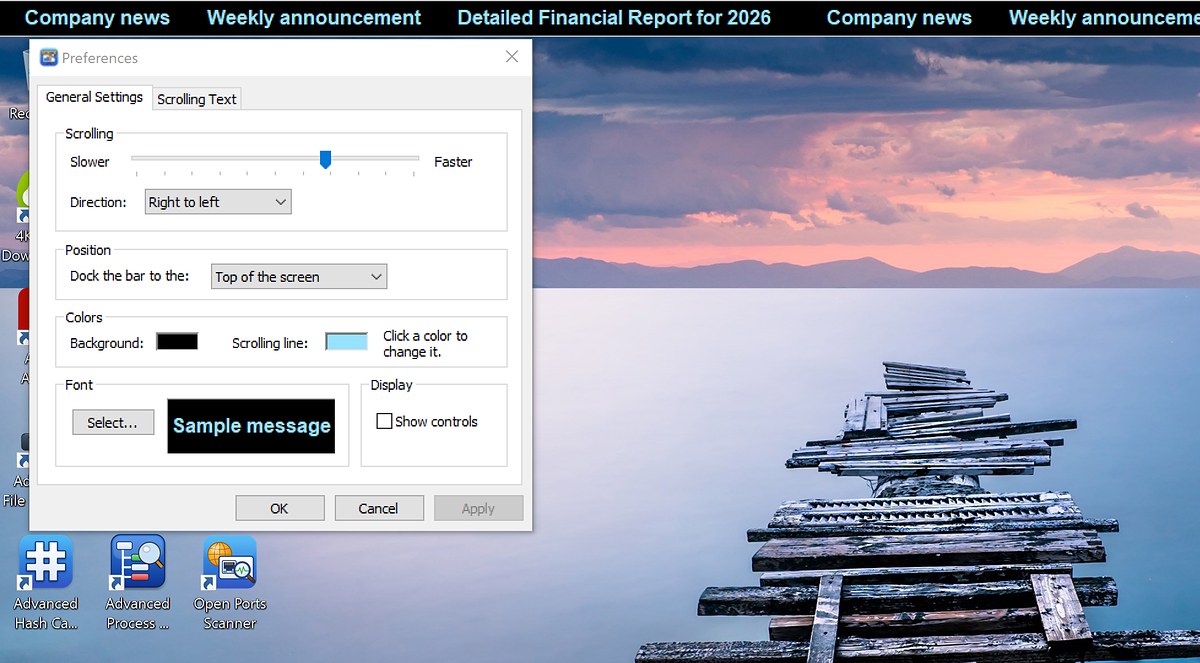
Features
Your messages, with clickable links
- Enter as many messages as you like; each one has a headline (up to 256 characters) and an optional target.
- The target can be anything Windows can open: a web address, a document or presentation, a folder, a program, or a mailto: address.
- Messages without a target are shown as plain text; messages with a target are underlined under the mouse pointer and show the hand cursor.
- Set the order of the messages with Move Up and Down; a new message is inserted after the selected one.
- Unicode text: headlines in any language and international characters in file names.
Always visible desktop toolbar
- The ticker docks to the top or to the bottom of the screen; Windows reserves this area, so other windows, even maximized ones, do not cover it.
- Correct size and position at any display scaling (100%, 125%, 150%...) and with the taskbar on any edge of the screen.
- The bar restores its place automatically after the screen resolution changes or Windows Explorer restarts.
Smooth, controllable scrolling
- Smooth scrolling synchronized with the display refresh, without flicker or jerks.
- Speed slider from Slower to Faster with 50 fine steps; direction right to left or left to right.
- Controls on the right of the bar: scroll left or right (fast while the button is held), pause / resume, Preferences and Exit. The controls switch between a dark and a light style to match the background color.
- Hold the left mouse button on the bar to stop the line, or drag it with the mouse to scroll back to a message you missed.
Fully customizable appearance
- Choose the background and text colors from the Windows color palette.
- Any installed font, size and style, with a live Sample message preview in the colors you selected.
- Show or hide the controls on the right of the bar.
- Apply button: see the changes on the bar before you close the Preferences dialog.
- All settings and messages are saved and restored the next time the program starts. Settings and messages of earlier Presentation Ticker versions are imported automatically.
Use it on a trade show or kiosk computer to let visitors click through to your products and services, run it during a presentation to show announcements, contact details or a web address, or put company news, reminders and shortcuts to frequently used files in front of everyone in the office. Scrolling speed and direction, colors, font and position are all yours to choose, and the text moves smoothly in step with the display refresh.
Ordering
After a completed secure online order, an unlocking key file is emailed to you within two business days. Questions about ordering or registration: order@ashkon.com. Prices for all products are on the Order page.
Related software
Keywords Search Tool
FreewareFree keyword research tool: suggestions from Google, Bing, DuckDuckGo, YouTube, Amazon and Wikipedia for 16 countries, with meta tags and Ads keywords.
Wave Sound Recorder
FreewareFree sound recorder: record from a microphone or any input to WAV files with a live level meter, automatic file naming and a built-in player.