Advanced Hash Calculator
$19.95Calculate MD5, SHA-256, SHA-3, BLAKE3, CRC32, xxHash and 32 hash algorithms for many files and folders at once, multi-threaded, with export.

Advanced Cookie Manager is a cookie viewer and manager for Google Chrome, Microsoft Edge, Mozilla Firefox, Brave and Opera. Websites store cookies on your PC to remember logins, preferences and browsing activity. Ever wondered which sites have left cookies on your computer and what they contain?
Download free trial Buy now – $19.95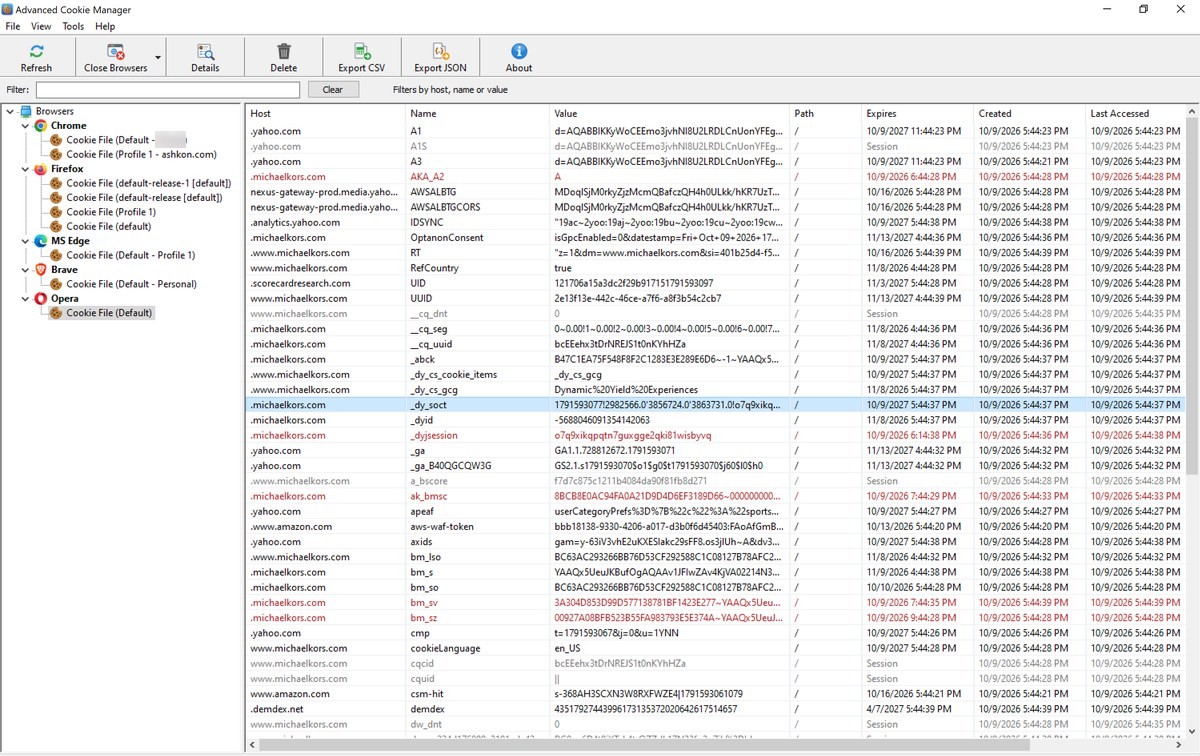
This program finds the cookie files of every browser profile on your computer, shows each cookie with its host, name, path, creation and expiration dates and security flags, and lets you search, export and delete them. Firefox cookie values are shown in full. Chrome and Edge encrypt cookie values, so for these browsers the value column shows (encrypted), while all other cookie information is displayed. Cookies can be read while the browser is running, and the program can also scan the other user accounts on the computer.
The left panel is a tree of browsers and the cookie files found for each browser profile. When you select a cookie file, the right panel lists its cookies, one per row. The toolbar has the most frequently used commands, and the Filter box above the list narrows the list as you type.
After a completed secure online order, an unlocking key file is emailed to you within two business days. Questions about ordering or registration: order@ashkon.com. Prices for all products are on the Order page.
Calculate MD5, SHA-256, SHA-3, BLAKE3, CRC32, xxHash and 32 hash algorithms for many files and folders at once, multi-threaded, with export.

Automatically shut down, reboot, power off or log off a PC, shut down a remote computer and schedule logon after reboot.
Securely erases files, folders, the Recycle Bin and drive free space with DoD 5220.22-M, Gutmann or random-data passes, then verifies the erasure.