

A thin desktop bar at the top or bottom of your screen that continuously downloads and scrolls stock quotes for the securities you choose.
News Ticker Application Bar - Scrolling News Ticker for the Windows Desktop
News Ticker keeps you up to date without opening a browser. A slim bar docked at the top of your screen scrolls the latest headlines from news publishers around the world, with the source of each story next to it. Choose the topics you care about, follow any company, person, product or team with keyword searches, and click a headline to read the full story.
Download free trial Buy now – $19.95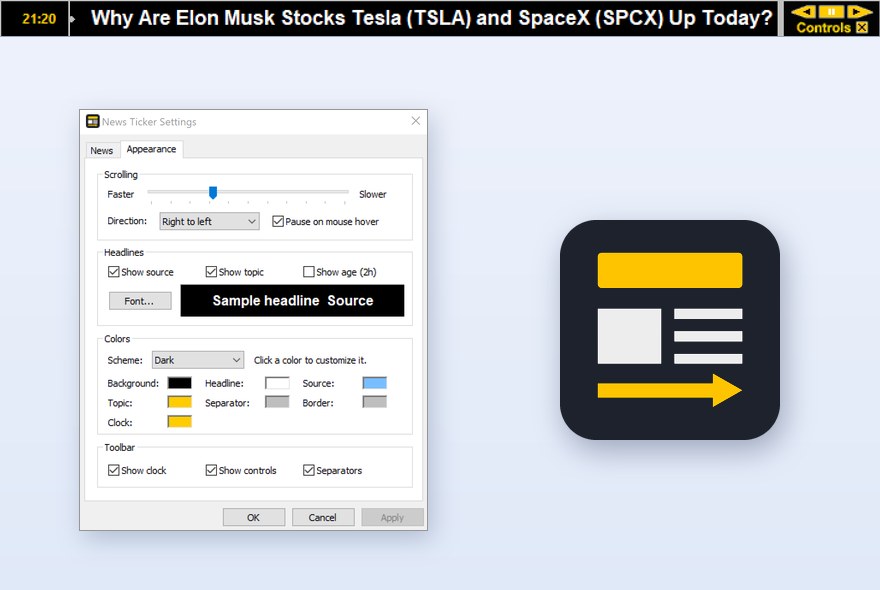
Features
- Latest headlines from news publishers worldwide, updated automatically at the interval you choose
- Nine topics: Top Stories, World, National, Business, Technology, Entertainment, Sports, Science and Health
- Keyword searches – follow any company, person, product or team
- 15 regional editions: United States, United Kingdom, Canada (English and French), Australia, India, Ireland, New Zealand, Germany, France, Spain, Italy, Russia, Ukraine and Japan
- Headlines grouped by topic or sorted newest first; choose how many headlines each feed shows
- Source, topic and age shown next to every headline
- One click on a headline opens the full story in your browser
- Pause on mouse hover, drag the line to scroll by hand, scroll right to left or left to right
- Adjustable scrolling speed and font
- Dark, Light or Custom color scheme with seven colors you can change
- Clock with status colors: green while downloading, amber if some feeds failed, red when the news service can’t be reached; click the clock to update now
- Controls panel to change direction, pause, open settings or exit; tray icon to update, hide or show the ticker
- Docked to the top of the screen as a Windows application bar, so maximized windows never cover it

How to put a news ticker on your Windows desktop
- Download and install the free 10-day trial of News Ticker Application Bar. The bar docks to the top of the screen and starts scrolling headlines.
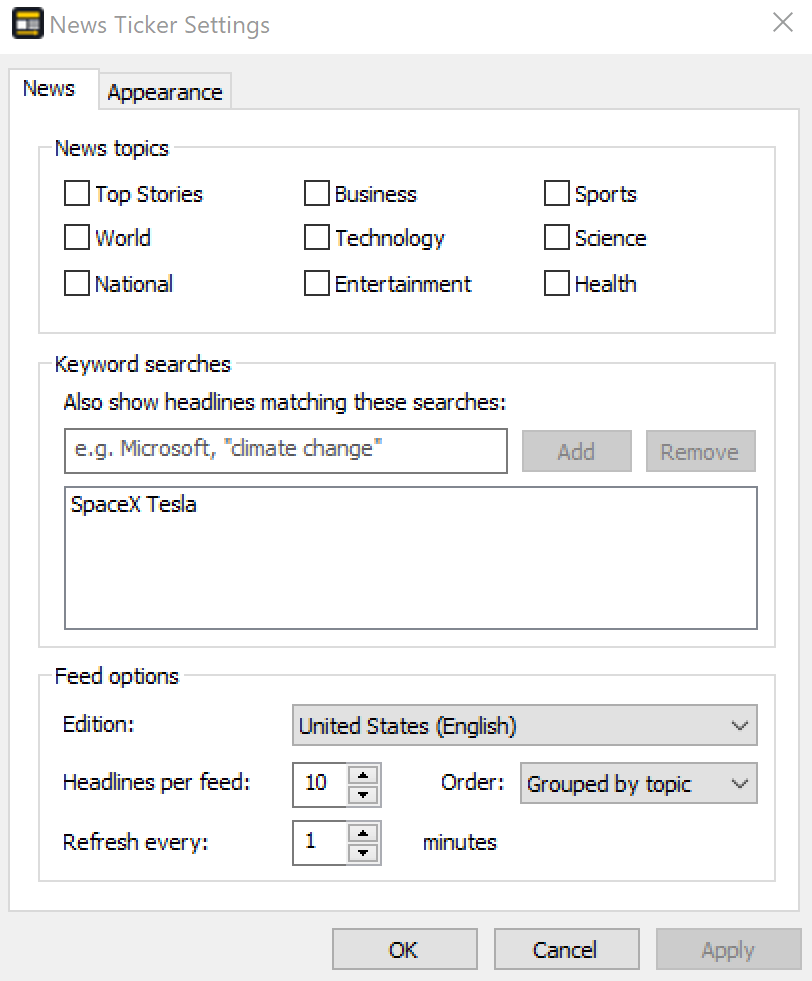
- Choose your news: right-click the bar and choose Settings. On the News tab tick the topics you want, such as Business, Technology or Sports, and click Add to follow a company, person or team by keyword.
- Pick an edition (country and language), how many headlines each feed shows and how often the ticker refreshes, in minutes.
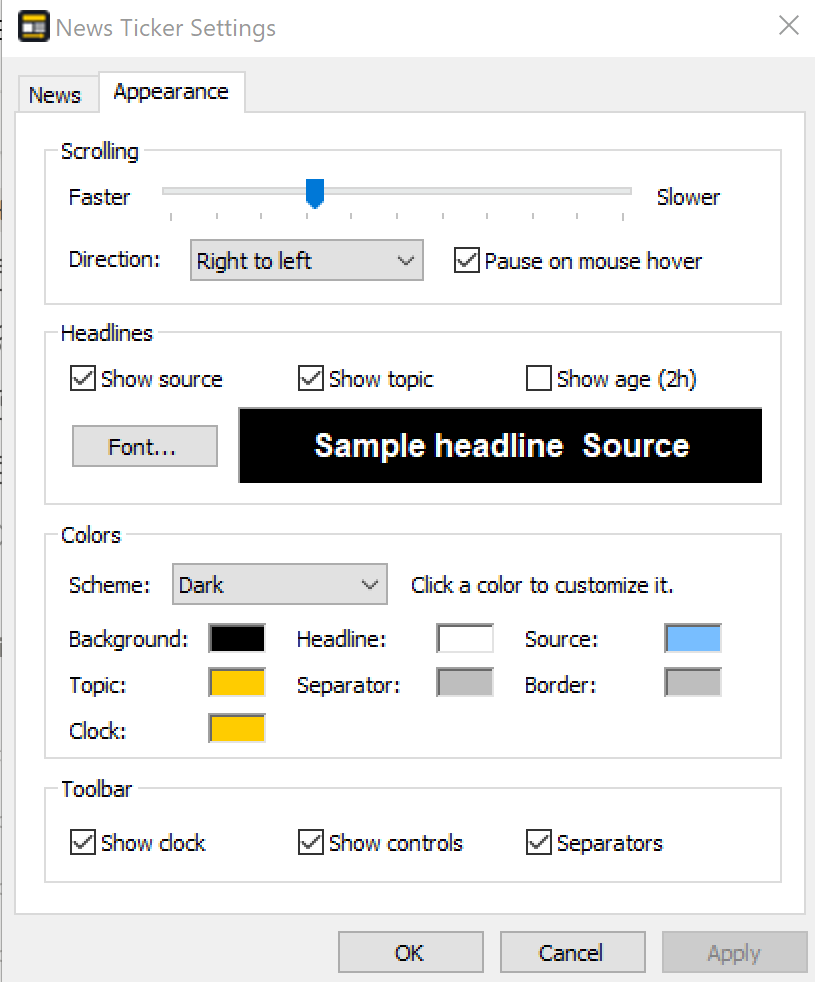
- Set the look on the Appearance tab: scrolling speed and direction, font, Dark, Light or Custom colors, and whether to show the source, topic and age of each headline.
- Read a story: click a headline to open the full article in your browser. Click the clock to update the news at once.
When you need a scrolling news ticker
- You work all day in other programs and want breaking news in view without opening a browser or refreshing news sites.
- You follow a company, product or team: a keyword search puts every new headline that mentions it on the bar.
- You read news from another country: choose one of 15 regional editions, for example the UK, Canada (French), Germany or Japan.
- Your screen is busy: the bar is a Windows application bar, so maximized windows end below it and never cover the headlines.
- You only care about one area, such as business or technology news, and want nothing else on the line.
Follow stocks instead of topics? The free Stock News Ticker scrolls headlines for up to 50 US stocks and ETFs. To scroll your own messages and links, see Presentation Ticker.
Settings
All options are on two tabs. On the News tab you pick the topics, add keyword searches, and choose the regional edition, the number of headlines per feed, the order and how often the ticker refreshes. The Appearance tab sets the scrolling speed and direction, what is shown next to each headline, the font, the color scheme and the clock, controls and separators of the bar.
Frequently asked questions
How do I get a news ticker on my Windows desktop?
Install News Ticker Application Bar. It docks a slim bar to the top of the screen and scrolls the latest headlines. Right-click the bar and choose Settings to pick topics, keyword searches and the regional edition.
Can I choose which news the ticker shows?
Yes. Tick any of nine topics: Top Stories, World, National, Business, Technology, Entertainment, Sports, Science and Health. You can also add keyword searches to follow any company, person, product or team.
Will the news ticker cover my other windows?
No. The bar is a Windows application bar docked to the top of the screen. Windows reserves that area, so maximized windows end below the bar.
How often are the headlines updated?
The ticker refreshes automatically at the interval you set in minutes on the News tab. Click the clock on the bar, or choose Update Now from the right-click or tray menu, to download the news at once.
Can I read news in other languages?
Yes. There are 15 regional editions, including English editions for the US, UK, Canada, Australia, India, Ireland and New Zealand, and editions in French, German, Spanish, Italian, Russian, Ukrainian and Japanese.
Does News Ticker work on Windows 11?
Yes. It runs on Windows 7, 8, 8.1, 10 and 11, 32-bit and 64-bit. It is a small native program and needs no extra runtimes.
Is there a free trial?
Yes. The free 10-day evaluation version lets you try the ticker before you buy. A license is $19.95, and a site license for unlimited installations in one organization is $299.95.
Ordering
After a completed secure online order, an unlocking key file is emailed to you within two business days. Questions about ordering or registration: order@ashkon.com. Prices for all products are on the Order page.
Related software
Presentation Ticker
$19.95Scroll your own messages across a desktop toolbar; each message can open a web page, document, folder or e-mail address.

Stock Sector Monitor
$49.95Watch 150 stock industries and 5000+ stocks: quotes, price changes, volume, reports, news, charts and portfolios.