

A thin desktop bar at the top or bottom of your screen that continuously downloads and scrolls stock quotes for the securities you choose.
Easy Currency Converter - Offline Currency Conversion for Windows
Easy Currency Converter converts more than 160 world currencies, including the Euro, and updates exchange rates with a single click. It is handy for quick conversions even when an Internet connection is not available.
Download free trial Buy now – $19.95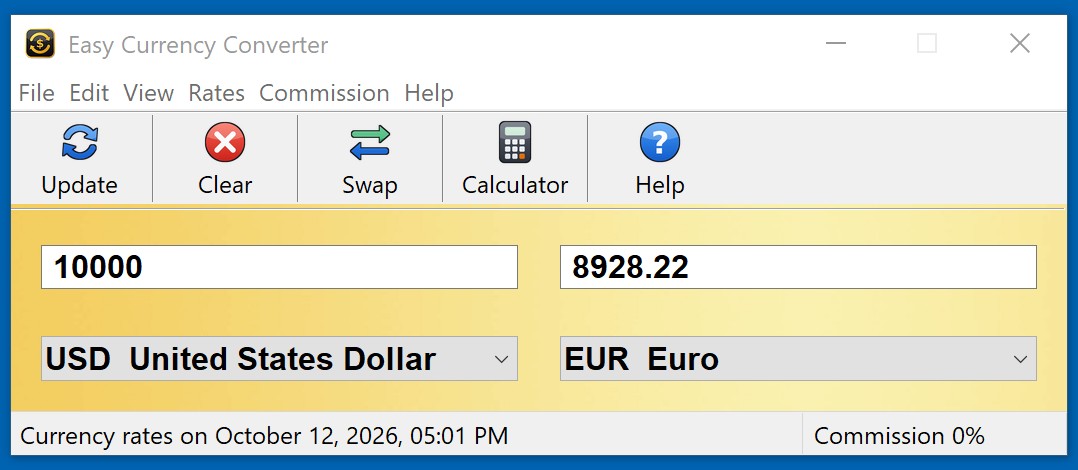
Features
- Converts more than 160 world currencies
- Major-currencies and all-currencies selection modes
- One-click exchange rate update
- Taskbar and always-on-top modes
- Cut, copy and paste
Two drop-down lists of world currencies, two boxes for the amounts, and the exchange rate used is shown in the status bar. Cross-currency rates are calculated through the US dollar. Only fiat currencies are included.
How to convert currency on Windows
- Download and install the free 10-day trial of Easy Currency Converter.
- Update the rates: click Update on the toolbar or press F5 (Rates > Update Now). The status bar shows the date of the rates. With Rates > Update Automatically, the rates are refreshed at start-up when they are more than 12 hours old.
- Choose the currencies in the two drop-down lists. View > Base Currencies shows only the major currencies; View > All Currencies shows the full list.
- Type an amount in either box. The converted amount appears in the other box as you type. Click Swap to exchange the two currencies.
- Optionally add a commission of 1 to 5 percent from the Commission menu to see what you get after a bank or exchange-office fee.
When you need a desktop currency converter
- No Internet connection: on a plane, abroad without roaming, or on an office PC with limited access. The last downloaded rates are kept, so conversion still works offline.
- Checking an invoice or a price in a foreign currency without opening a browser and a search page.
- Travel budgeting: see what a hotel, a meal or a souvenir costs in your own money.
- Estimating exchange fees: the commission setting shows the amount after a 1–5% fee.
- Frequent conversions during the day: Stay on Top keeps the converter above other windows, and File > Hide puts it in the system tray.
Follow the markets too? Stock News Ticker is a free desktop bar with the latest headlines for your stocks, and Stock Ticker Application Bar scrolls stock quotes across the top of the screen.
Frequently asked questions
Does the currency converter work offline?
Yes. The exchange rates are downloaded when you click Update and are saved on your computer. Without an Internet connection the program converts with the last downloaded rates, and the status bar shows their date.
How many currencies does Easy Currency Converter support?
More than 160 world currencies, including the US dollar, euro, British pound, Japanese yen, Canadian dollar and Swiss franc. Only fiat currencies are included, no cryptocurrencies.
How do I update exchange rates?
Click Update on the toolbar or press F5. With Rates > Update Automatically turned on, the program also updates the rates when it starts if they are more than 12 hours old.
Where do the exchange rates come from?
Rates are downloaded from free internet sources. No account or API key is needed. Cross rates between two non-dollar currencies are calculated through the US dollar.
Can I include a bank commission in the conversion?
Yes. The Commission menu applies 0 to 5 percent to the converted amount, and the status bar shows the commission in use.
Does it run on Windows 11?
Yes. Easy Currency Converter runs on Windows 7, 8, 8.1, 10 and 11, 32-bit and 64-bit.
Is there a free trial?
Yes. The free 10-day evaluation version lets you try the program before you buy. A license is $19.95.
Ordering
After a completed secure online order, an unlocking key file is emailed to you within two business days. Questions about ordering or registration: order@ashkon.com. Prices for all products are on the Order page.
Related software

A slim bar at the top of your screen that scrolls the latest news headlines for your topics and keywords. Click a headline to read the article.

Stock Predictor
$295.00Stock charting and technical analysis software. Backtest trading strategies, view buy and sell signals on charts, with dozens of indicators and 600+ combined strategies.