Presentation Ticker
$19.95Scroll your own messages across a desktop toolbar; each message can open a web page, document, folder or e-mail address.

AreaZoom is a screen magnifier and color picker for Windows. Drag the target from the Picker onto any part of the screen and AreaZoom shows a magnified view of that area in its main window, with an optional pixel grid and crosshair, so you can see individual pixels of text, icons and graphics.
Download free trial Buy now – $19.95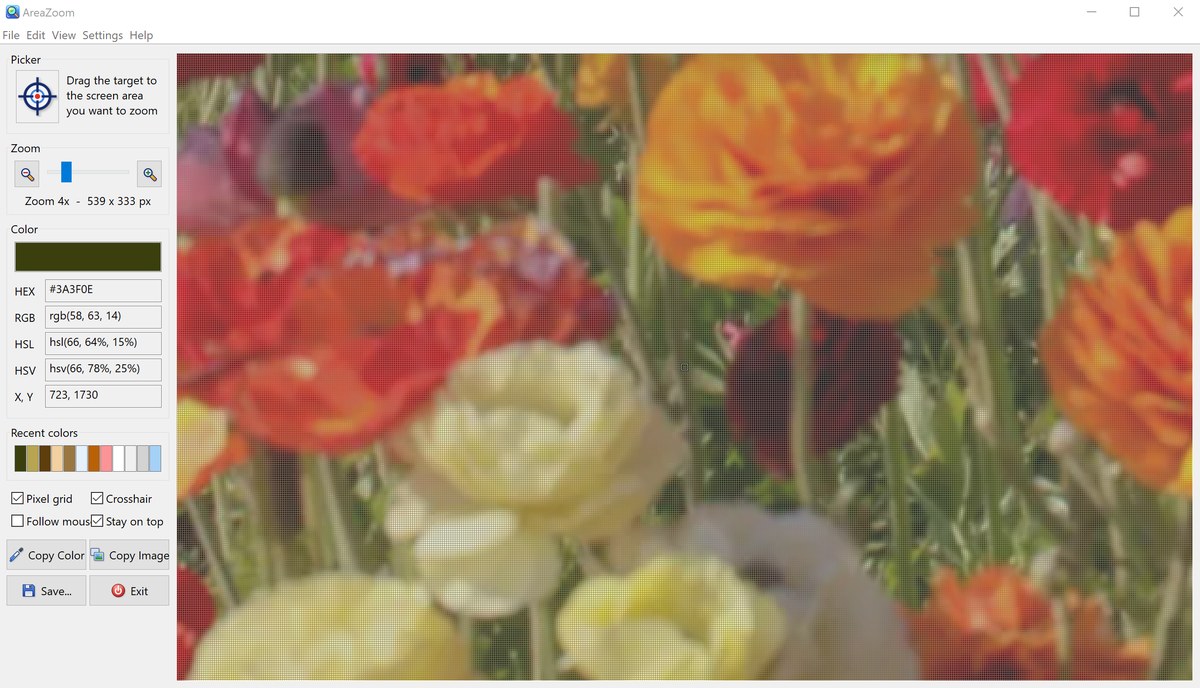
The color of the pixel under the crosshair is shown as a color swatch and in HEX, RGB, HSL and HSV notation, together with its X, Y screen coordinates. Recently picked colors are kept in a palette. Copy the color value or the zoomed image to the clipboard with one click, or save the image to a file. AreaZoom is useful for web designers, developers and anyone who needs to check exact colors, sizes and alignment on the screen.
The left panel holds the Picker, the Zoom controls, the color values, the recent colors palette, the view options and the Copy and Save buttons. The right side shows the magnified area of the screen. In the screenshot below a photo is zoomed 4x with the pixel grid and crosshair turned on.
After a completed secure online order, an unlocking key file is emailed to you within two business days. Questions about ordering or registration: order@ashkon.com. Prices for all products are on the Order page.
Scroll your own messages across a desktop toolbar; each message can open a web page, document, folder or e-mail address.
Batch website screenshot capture: full-page screenshots, thumbnails and PDF for long lists of URLs, up to 20 pages in parallel.
Free keyword research tool: suggestions from Google, Bing, DuckDuckGo, YouTube, Amazon and Wikipedia for 16 countries, with meta tags and Ads keywords.