GetNetworkInfo
$19.95Home network scanner: finds every device on your network and identifies it – IP and MAC address, manufacturer, device type, name and open ports.

Open Ports Scanner lists every open TCP and UDP port and network connection on your computer, IPv4 and IPv6, together with the process that owns it – and who is on the other end. For each connection you see the protocol, process ID, process name or full path, local and remote addresses and ports, connection state, remote host name and the network that owns the remote address.
Download free trial Buy now – $19.95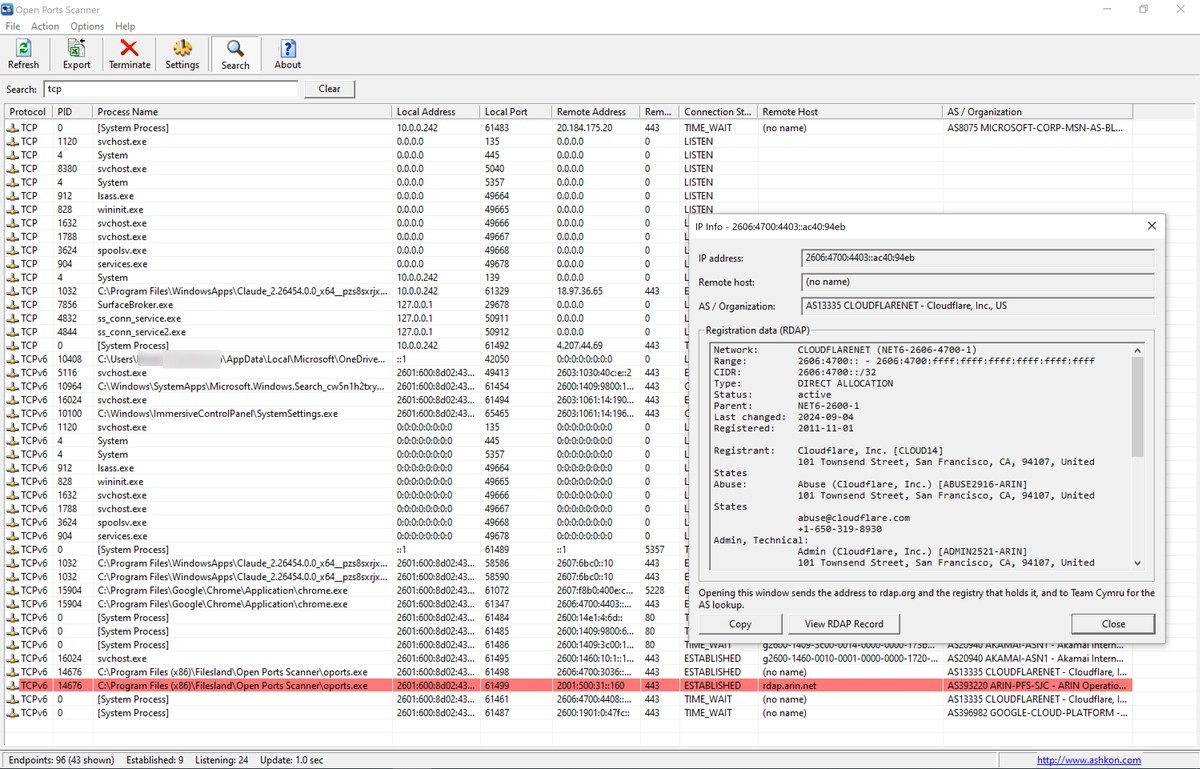
It is a fast, readable replacement for netstat. Use it to find unknown programs talking to the Internet, detect trojans and other malicious software, check which services are listening on your machine and troubleshoot network problems. The list updates automatically and without flicker: new connections flash green and closed ones flash red, so you can watch network activity as it happens.
Looking for devices, not ports? Open Ports Scanner shows the ports and connections of this computer. To find every device on your home network or Wi-Fi, use GetNetworkInfo. To test whether a port answers on a remote server, use the TCP Port Check in PingTrace.
The connection list with the Search bar above it, the Remote Host and AS / Organization columns, and the IP Info window showing the registration record of a remote address. The status bar at the bottom shows the connection statistics.
Start Open Ports Scanner, press Ctrl+F and type the port number. The list shows the TCP or UDP endpoint on that port with the process ID and the name or full path of the program that owns it. Choose Action > Run as Administrator to see the names of system services too.
Every TCP connection is listed with its remote address, remote port and state. The Remote Host column shows the reverse DNS name of the remote address, the AS / Organization column shows the network that owns it, and IP Info shows its registration record with the country and abuse contact.
Yes. It shows the same kind of list as netstat -ano, in a window that refreshes automatically, with process names, host names, sorting, search, CSV export and printing.
Yes, for TCP connections over IPv4: select the connection and choose Action > Close Connection. The program that owns it keeps running. Closing UDP endpoints and IPv6 TCP connections is not supported. If closing fails, run Open Ports Scanner as administrator.
No. It lists the open ports and connections of the computer it runs on. To test a port on a remote server, use the TCP Port Check in PingTrace. To find the devices on your network and their open ports, use GetNetworkInfo.
Yes. It runs on Windows 10 and 11 and on Windows 7, 8 and 8.1, 32-bit and 64-bit, and shows both IPv4 and IPv6 connections.
Yes. The free 30-day evaluation version lets you check the ports and connections of your own computer before you buy. A license is $19.95.
After a completed secure online order, an unlocking key file is emailed to you within two business days. Questions about ordering or registration: order@ashkon.com. Prices for all products are on the Order page.
Home network scanner: finds every device on your network and identifies it – IP and MAC address, manufacturer, device type, name and open ports.
Ping and traceroute side by side, with continuous MTR mode, per-hop loss, jitter and latency, ASN lookup, Whois and TCP port check.
Visual traceroute for Windows with min/avg/max RTT, packet loss and a latency graph per hop, plus host name, ASN and country of every router.