
Batch website screenshot capture: full-page screenshots, thumbnails and PDF for long lists of URLs, up to 20 pages in parallel.
Translation Pad: Translate Text Between 144 Languages on Windows
Translation Pad is a simple, fast desktop translator for Windows. Type or paste text in the top pane, choose the target language and press Translate — the translation appears in the bottom pane. Translate between 144 languages, let the program detect the source language for you, and translate whole documents of up to 50,000 characters in one click.
Download free trial Buy now – $29.95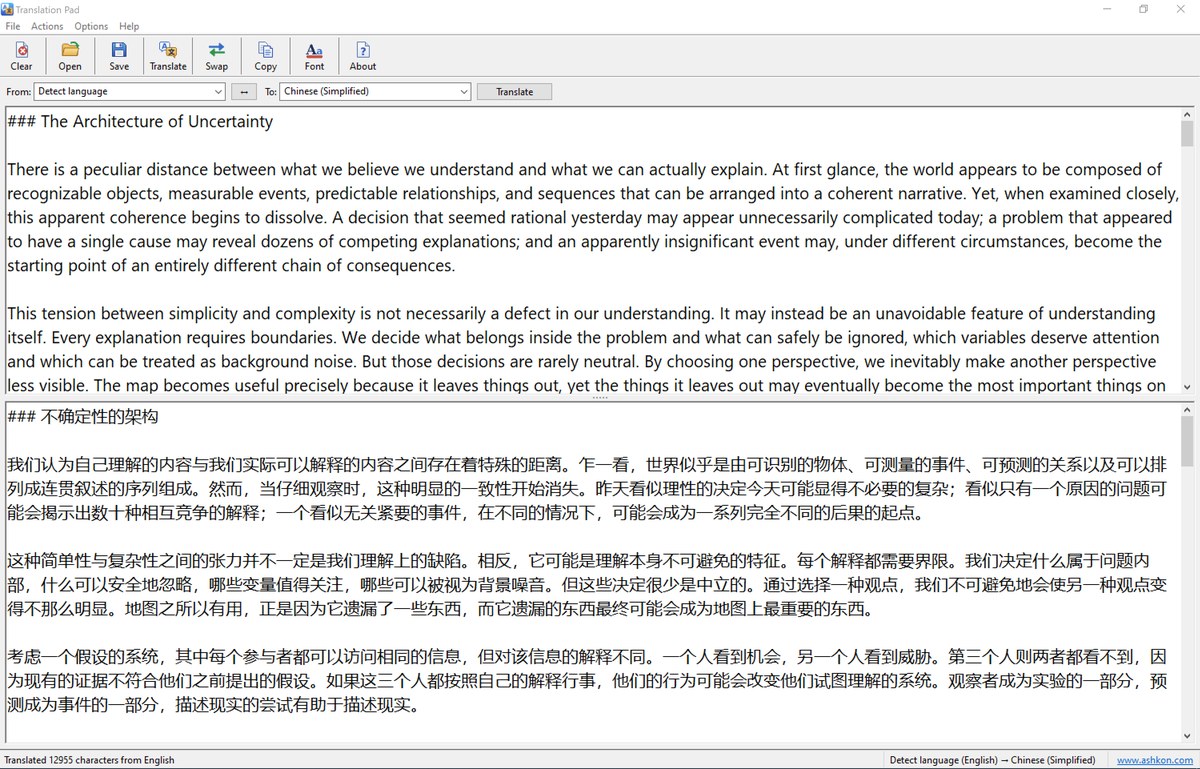
Features
Translation
- 144 languages, from Afrikaans to Zulu, including Chinese (Simplified and Traditional), Japanese, Korean, Arabic, Hebrew, Hindi, Russian and all major European languages.
- Automatic language detection: choose "Detect language" and the status bar shows which language was detected.
- Long texts: up to 50,000 characters per translation. Long texts are split automatically at line, sentence or word boundaries and translated in several requests, with progress shown in the status bar.
- Line breaks and paragraphs are preserved, so the translation keeps the layout of the original text.
- Swap languages with one click to translate the result back into the original language — the text in the two panes is swapped as well.
- Background translation: the program stays responsive while it translates; press Esc to cancel.
Files and clipboard
- Open text files of up to 10 MB. UTF-8, UTF-16 (little and big endian) and ANSI encodings are detected automatically.
- Save the translation as a UTF-8 text file that opens correctly in Notepad, Word and any other editor.
- Copy the translation to the clipboard with one click (Ctrl+Shift+C).
- Full Unicode support for text in any language and script.
Convenient interface
- Two text panes — original on top, translation below — with a splitter you can drag to resize them.
- Toolbar with large buttons, menus and keyboard shortcuts for every command.
- Choose the font and font size of the text panes.
- Stay on top option keeps the translator above other windows while you work.
- Languages, font, window position and pane sizes are remembered between sessions.
Open text files in any common encoding, save translations as Unicode text, copy them to the clipboard, and swap the languages to translate the result back. Translation runs in the background, so the window stays responsive and a long translation can be cancelled at any time.
Main window
The language bar is below the toolbar. The text to translate is in the top pane and the translation is in the bottom pane. The status bar shows the result of the last translation and the language pair.
Ordering
After a completed secure online order, an unlocking key file is emailed to you within two business days. Questions about ordering or registration: order@ashkon.com. Prices for all products are on the Order page.
Related software
Presentation Ticker
$19.95Scroll your own messages across a desktop toolbar; each message can open a web page, document, folder or e-mail address.
AreaZoom
$19.95Screen magnifier and color picker: zoom in on any part of the screen with a pixel grid and pick colors in HEX, RGB, HSL and HSV.