
Stock Quotes Pro
Using Stock Quotes Pro Data in MetaStock
MetaStock reads its own binary data format, so text files downloaded with Stock Quotes Pro are converted once with the MetaStock DownLoader utility that comes with MetaStock. After that, the quotes chart like any other MetaStock security.
1. Download the data in MetaStock format
- In Stock Quotes Pro, choose Tools > Settings.
- Under Select Custom Format, select MetaStock Downloader and click Apply. This writes each line as
SYMBOL,with the date as YYYYMMDD, the oldest day first, and a MetaStock header. MetaStock needs the symbol at the start of every line.D, Date, Open, High, Low, Close, Volume - Click OK, then click Update to download the symbols.
<ticker>,<per>,<date>,<open>,<high>,<low>,<close>,<vol>
AAPL,D,20260923,250.20,253.15,249.80,252.60,51287400
AAPL,D,20260924,252.95,255.40,251.10,254.30,48115300
2. Convert the files
Start the MetaStock DownLoader and choose Tools > Convert. The Convert Securities dialog opens.
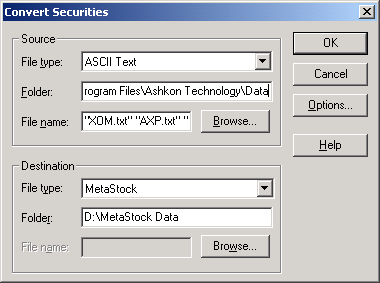
- Source – select the Stock Quotes Pro data folder (by default
Documents\Stock Quotes Pro\Data) and set the file extension, for example*.txt. Click Browse to select the files. Hold Shift and use the arrow keys to select several files at once. - Destination – the folder for the converted MetaStock files, for example
C:\MetaStock Data.
3. Set the conversion options
Click Options. Select the date range you need, check Traverse folders and set the periodicity to Daily.
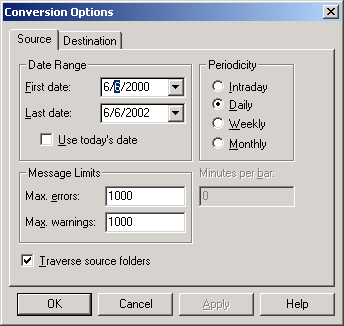
On the Source tab select Daily. On the Destination tab choose whether to append the data to existing MetaStock files or to overwrite them.
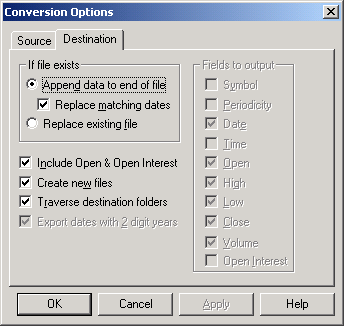
Back up your data before you choose an existing MetaStock folder as the destination, and check the append and overwrite options.
Click Apply, then OK in the Convert Securities dialog. The converted securities are ready to open in MetaStock.
More about output formats: Stock Quotes Pro User Guide – using the data in charting software.