
Historical Quotes Downloader
Download Settings
The Download Settings tab controls what Historical Quotes Downloader downloads and how the data files are written. Settings are saved automatically and are used for every download until you change them.
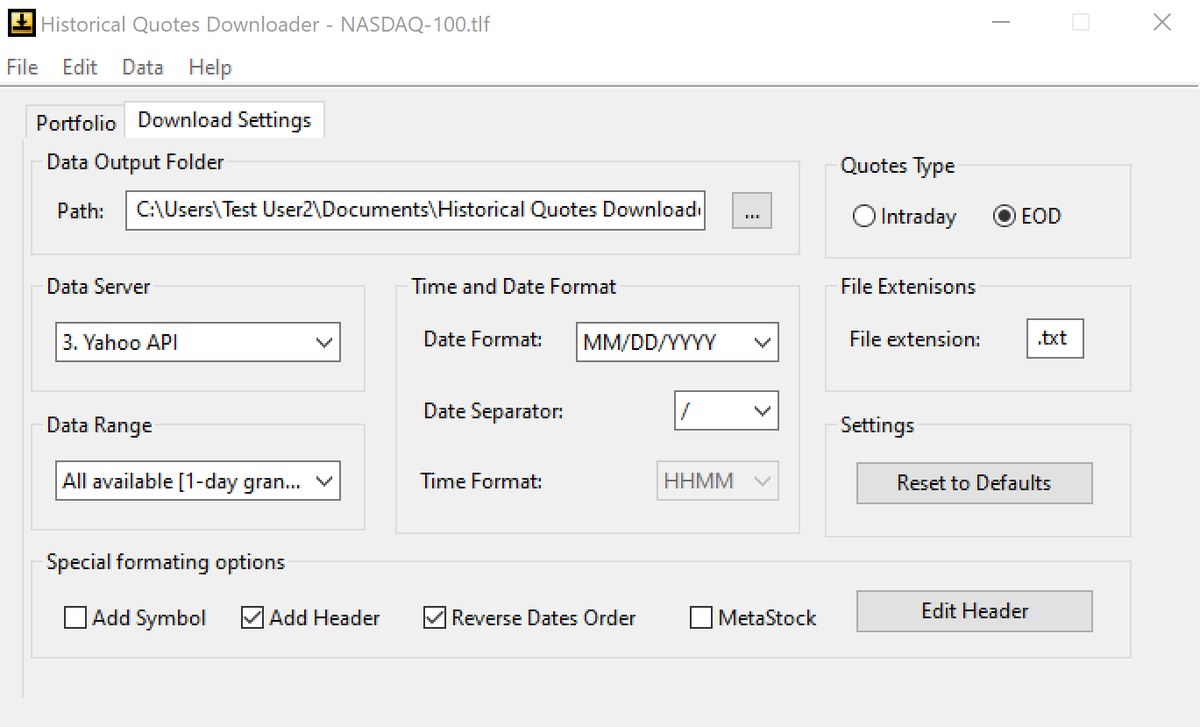
Quotes Type
EOD downloads daily (end-of-day) bars. Intraday downloads 1-minute or 5-minute bars. Switching the type reloads the lists of data servers and data ranges. See intraday and international quotes.
Data Output Folder
Where the data files are saved. EOD and intraday data have separate folders, by default Historical Quotes Downloader\Data and Historical Quotes Downloader\Intraday in your Documents folder. Click ... to choose another folder. The folder must exist and you must be allowed to write to it.
Data Server and Data Range
Data Server selects the quote server to download from. Data Range sets how far back to download; the choices depend on the server. If the range you had selected is not offered by the server you switch to, the first available range is selected, so check it after changing servers. The servers and their ranges are listed in the user guide.
File extension
The extension of the data files (default .txt). The file name is always the symbol, for example MSFT.txt. To keep several timeframes of the same symbol without overwriting them, use a different extension for each, for example .d1 for daily and .m5 for 5-minute data.
Time and Date Format
| Setting | Choices |
|---|---|
| Date Format | MMDDYY, MMDDYYYY, DDMMYY, DDMMYYYY, YYMMDD or YYYYMMDD |
| Date Separator | /, -, . or None |
| Time Format | HHMM or HH:MM (intraday only) |
Special formatting options
| Option | What it does |
|---|---|
| Add Symbol | Adds the ticker as the first column of every line. Useful when you combine several files into one. |
| Add Header | Writes a line with column names at the top of each file. |
| Reverse Dates Order | Reverses the order of the rows (newest first or oldest first). Most charting programs expect the oldest bar first. |
| MetaStock | Sets the date format, field order and header so the file can be converted for MetaStock. The file is still plain text. |
| Edit Header | Changes the header text. Defaults: Date,Open,High,Low,Close,Volume (EOD) and Date,Time,Open,High,Low,Close,Volume (intraday). |
Reset to Defaults
Puts all settings back as they were right after installation.