
Historical Quotes Downloader
Commands and Command Line Options
The buttons and menus on the Portfolio tab manage the symbol list and start downloads. Command line options let you run downloads from a script or from Windows Task Scheduler.
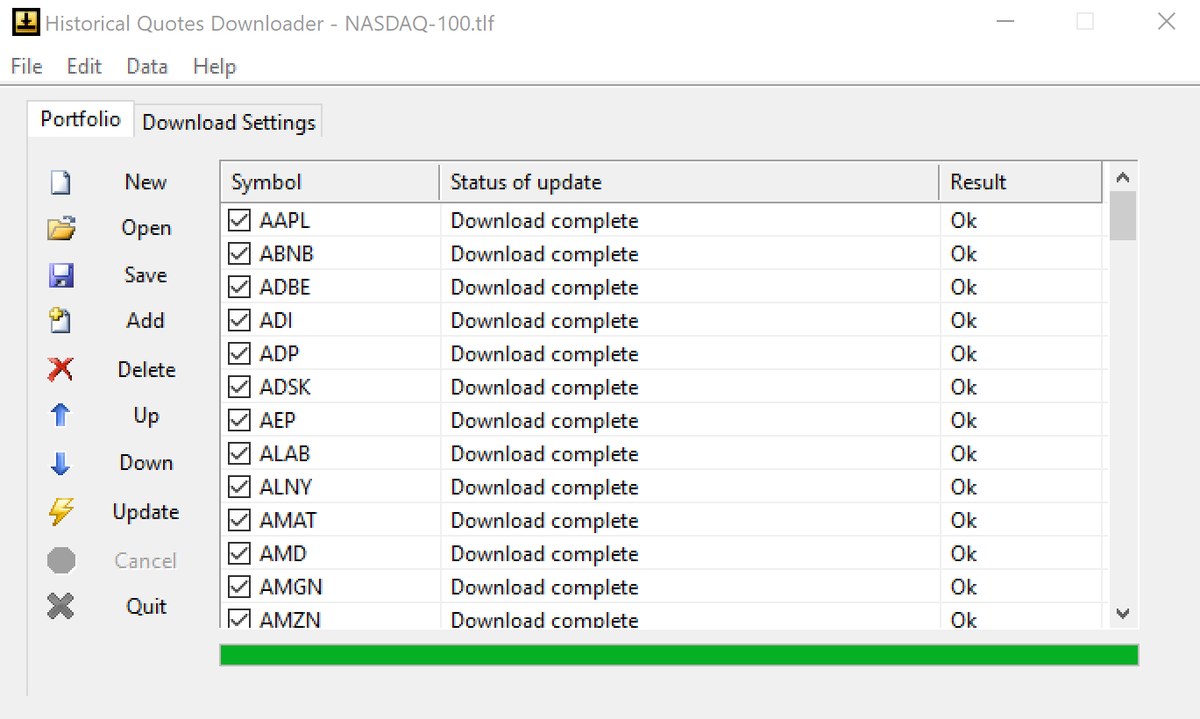
Buttons
| Button | What it does |
|---|---|
| New | Starts a new, empty symbol list. |
| Open | Opens a saved symbol list (.tlf or .txt). |
| Save | Saves the current symbols to a symbol list file. |
| Add | Adds a new symbol to the list. |
| Delete | Deletes the selected symbols from the list. |
| Up / Down | Moves the selected symbol up or down one row. |
| Update | Downloads data for all checked symbols. |
| Cancel | Stops the download. Available only while a download is running. |
| Quit | Closes the program. |
Right-click menu
Right-click the symbol list for Check All, Uncheck All, Check Highlighted, Uncheck Highlighted, Update and Update Highlighted. Update Highlighted downloads only the selected rows, whether they are checked or not. To select several rows, hold Ctrl and click, or hold Shift and click to select a range.
Sorting
Click a column heading to sort the list alphabetically. Sorting is not available while a download is running.
Command line options
| Option | What it does |
|---|---|
-o <file> | Starts the program and opens the symbol list. |
-auto <file> | Opens the symbol list, checks all symbols and starts Update right away, using the current Download Settings. |
Put paths that contain spaces in quotes. Example – open a list and download all its symbols:
"C:\Program Files\Ashkon Technology\HQDownload\hdown.exe" -auto
"C:\Users\John\Documents\Historical Quotes Downloader\Symbols\NASDAQ-100.tlf"
Replace the paths with the ones on your computer.
Download automatically every day
- Set Quotes Type, Data Server, Data Range and formatting on the Download Settings tab. Command line runs use these settings.
- Open Task Scheduler in Windows and choose Create Basic Task.
- Choose a daily trigger after the market closes.
- For the action choose Start a program, browse to
hdown.exeand type-auto "full path to your .tlf file"as the arguments.