
Stock Predictor guide
Creating a Symbol List
Start by choosing the stocks and indices you want to analyze. Stock Predictor keeps groups of stocks in symbol list files – plain text files with one symbol per line.
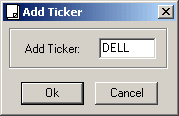
Add symbols in the program
- Choose Edit > Add Ticker or click
 on the toolbar.
 - Type a stock symbol and click OK. The symbol appears in the Companies tab.
- When asked to download historical data for it, click OK. When the download finishes, open the Daily Chart tab to see the chart.
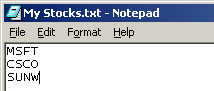
Create a list in a text editor
Type the tickers in Notepad or another plain text editor, one per line, and save the file. Then choose File > Open or click  and select the file. All its symbols appear in the Companies tab.
Save the list
Choose File > Save or click  to save the symbols in the Companies tab to a file, so you can open the same group again later.