Stock Predictor guide
Manual Strategy Performance Analysis
You can backtest your own decisions: go back in time and place Buys and Sells by hand, then see how they would have performed.
Record Buy and Sell signals
- Hold down the left mouse button on the chart and move to the day you want.
- Click
 on the toolbar to record a Buy, or
  to record a Sell.
 - Repeat for each transaction.
Trading History
The Trading History tab lists the transactions over the selected period.
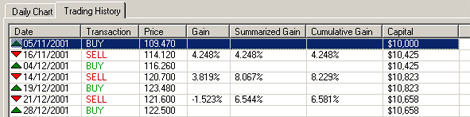
- Summarized Gain – a fixed amount, $10,000 in this example, is invested each time.
- Cumulative Gain – the money from each sale is reinvested.
Statistics
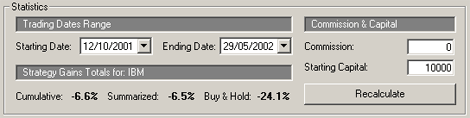
The Statistics panel sets the trading date range, commission and starting amount, and shows the total summarized or cumulative performance compared with buy and hold – buying on the starting date and selling on the ending date.