
Historical Quotes Downloader Settings
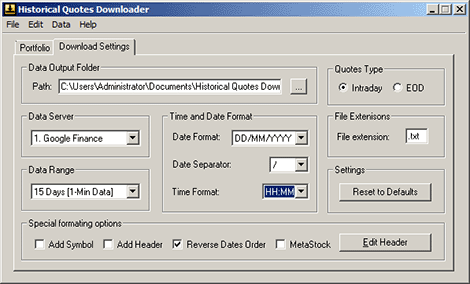
The following screenshot presents software settings tab:
"Quotes Type" switches between stock quotes downloading modes. HQD can download INTRADAY or End-of-Day stock quotes.
"Data Output Folder" shows the location on the hard drive where the data files will be stored. Make sure that you set a valid folder for "Historical Data Folder" - use "Browse" button next to it.
"File extensions" box allows to set a custom extensions for the files. Note that the file name will always be the same as the symbol. Thus if you want to keep data for the same symbol in different formats, like 1-year, 5-year and 15 years, you may assign different extensions for each time-frame, i.e. ".dat5", ".dat20" and so on. This will ensure that the data will not be overwritten by the subsequent download.
"Data Server" and "Data Range" specify which quotes server to use when downloading data, and how long back in time data has to be downloaded.
"Date Format", "Time Format", "Date Separator" and "Edit Header" customize output for the date and columns header.
"Reset to defaults" will bring all the settings to the original state just like when the software was initially installed.
"Connection Speed" setting optimizes retry timeout request delay depending on your internet connection speed.
"Data Range" selection box allows to specify how long back in time historical quotes should be retrieved from preset intervals
"Data Server" selection box allows selecting
Special formatting options include
"Add Header" - adds column header text to the output files.
"Add symbol" - will add stock ticker column as the first column of the output
Checking "Reverse Data" will change chronological order of the quotes in the output file.
"MetaStock" checkbox is automatically adjusting date, field and time order and settings so that data can be later converted into MetaStock text format.
Copyright © 2000-2016, Ashkon Software
L.L.C.
Privacy Policy | Disclaimer